
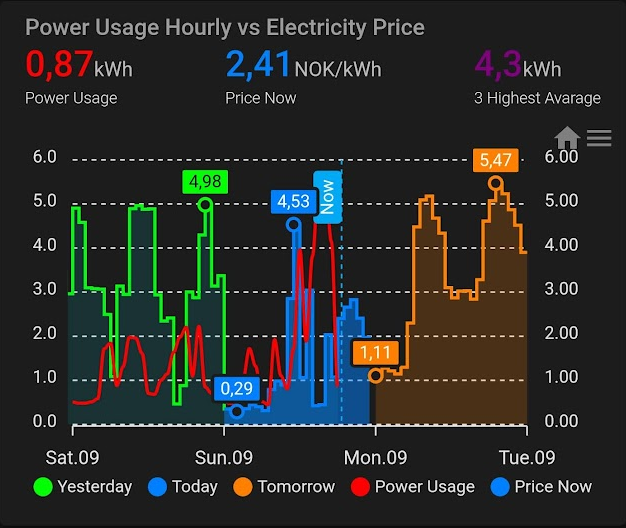
I wanted to see my Power Consumption together with Electricity Price in a nice graphical representation.
For that, I used ApexCharts-Card: https://github.com/RomRider/apexcharts-card
The graph uses data from Tibber, Tibber Data, and Nordpool integrations.
- Tibber: https://www.home-assistant.io/integrations/tibber/
- Tibber Data: https://github.com/Danielhiversen/home_assistant_tibber_data
- Nordpool: https://github.com/custom-components/nordpool
The result is shown in the image, and the code can be downloaded here:
type: custom:apexcharts-card
header:
  show: true
  title: Power Usage Hourly vs Electricity Price
  show_states: true
  colorize_states: true
now:
  show: true
  label: Now
graph_span: 72h
span:
  start: day
  offset: '-24h'
apex_config:
  xaxis:
    labels:
      format: dd.MM
  chart:
    zoom:
      enabled: true
    toolbar:
      show: true
      tools:
        zoom: true
        zoomin: false
        zoomout: false
        pan: false
        reset: true
  tooltip:
    fixed:
      enabled: true
      position: bottomLeft
yaxis:
  - id: first
    apex_config:
      min: 0
      opposite: true
      forceNiceScale: true
      decimalsInFloat: 2
      labels:
        show: true
  - id: second
    apex_config:
      opposite: false
      forceNiceScale: true
      decimalsInFloat: 1
      labels:
        show: true
all_series_config:
  stroke_width: 4
series:
  - entity: sensor.nordpool_kwh_oslo_nok_3_10_025
    yaxis_id: first
    name: Yesterday
    type: area
    curve: stepline
    float_precision: 2
    stroke_width: 2
    opacity: 0.05
    extend_to: false
    offset: '-1min'
    show:
      in_header: false
      legend_value: false
      in_chart: true
      extremas: true
      offset_in_name: false
    color: '#00FF00'
  - entity: sensor.nordpool_kwh_oslo_nok_3_10_025
    yaxis_id: first
    name: Today
    type: area
    curve: stepline
    float_precision: 2
    stroke_width: 2
    opacity: 0.5
    extend_to: false
    offset: '-1min'
    show:
      in_header: false
      legend_value: false
      extremas: true
      offset_in_name: false
    color: '#0080FF'
    data_generator: |
      return entity.attributes.raw_today.map((p) => {
        return [new Date(p.start), p.value];
      });
  - entity: sensor.nordpool_kwh_oslo_nok_3_10_025
    yaxis_id: first
    name: Tomorrow
    type: area
    curve: stepline
    float_precision: 2
    stroke_width: 2
    opacity: 0.2
    offset: '-1min'
    show:
      in_header: false
      legend_value: false
      extremas: true
      offset_in_name: false
    color: '#FF7F00'
    data_generator: |
      return entity.attributes.raw_tomorrow.map((p) => {
        return [new Date(p.start), p.value];
      });
  - entity: sensor.accumulated_consumption_current_hour
    yaxis_id: second
    name: Power Usage
    type: line
    float_precision: 2
    stroke_width: 2
    opacity: 1
    color: '#FF0000'
    extend_to: false
    show:
      in_header: true
      legend_value: false
    group_by:
      func: max
  - entity: sensor.nordpool_kwh_oslo_nok_3_10_025
    yaxis_id: first
    name: Price Now
    type: area
    curve: stepline
    float_precision: 2
    stroke_width: 0
    opacity: 0.1
    extend_to: false
    show:
      in_header: true
      legend_value: false
      in_chart: true
    color: '#0080FF'
  - entity: sensor.average_of_3_highest_hourly_consumption
    yaxis_id: second
    name: 3 Highest Avarage
    type: line
    float_precision: 2
    stroke_width: 2
    opacity: 1
    color: '#800080'
    extend_to: false
    show:
      in_header: true
      legend_value: false
      in_chart: false
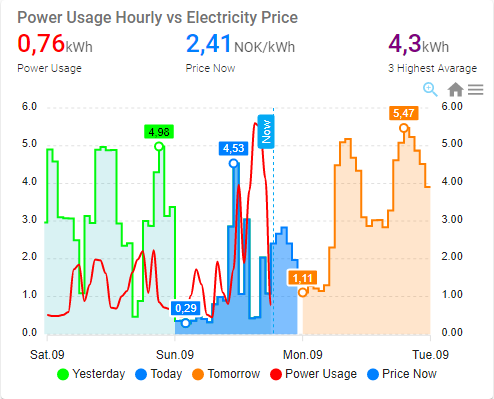
Below is a screenshot from my phone in Light Mode.
I have 3 template sensors to find the cheapest hours:
- Cheapest 3 hours
- Cheapest 4 hours
- Cheapest 6 hours
The code below should be placed in sensors.yaml.
- platform: template
  sensors:
    cheapest_3_hours:
      value_template: >-
        {% set l=state_attr('sensor.nordpool_kwh_no1_nok_3_10_025', 'raw_today')|sort(attribute='value') %}
        {{ (now() >= l[0].start and now() <= l[0].end)
          or (now() >= l[1].start and now() <= l[1].end)
          or (now() >= l[2].start and now() <= l[2].end) }}

- platform: template
  sensors:
    cheapest_4_hours:
      value_template: >-
        {% set l=state_attr('sensor.nordpool_kwh_no1_nok_3_10_025', 'raw_today')|sort(attribute='value') %}
        {{ (now() >= l[0].start and now() <= l[0].end)
          or (now() >= l[1].start and now() <= l[1].end)
          or (now() >= l[2].start and now() <= l[2].end)
          or (now() >= l[3].start and now() <= l[3].end) }}

- platform: template
  sensors:
    cheapest_6_hours:
      value_template: >-
        {% set l=state_attr('sensor.nordpool_kwh_no1_nok_3_10_025', 'raw_today')|sort(attribute='value') %}
        {{ (now() >= l[0].start and now() <= l[0].end)
          or (now() >= l[1].start and now() <= l[1].end)
          or (now() >= l[2].start and now() <= l[2].end)
          or (now() >= l[3].start and now() <= l[3].end)
          or (now() >= l[4].start and now() <= l[4].end)
          or (now() >= l[5].start and now() <= l[5].end) }}
Hei Martin!
Først og fremst, kjempeflott fremstilling, og ikke minst supert at du deler.
Kan du dog dele template sensorene og? Det er lettere å følge guiden om man trinn for trinn skaper de dependencies som er en forutsetning for å bruke guiden og få til samme resultat 🙂